

Complete List of Scan Features
SCAN Acquisition Software
On-
SCAN Acquisition software is a comprehensive tool that serves as the interface to the SynAmps, SynAmps 2 and NuAmps. SCAN Acquisition provides a multitude of recording options which are saved in unique files that can be recalled for each experiment, ensuring that each individual data set is acquired with the same parameters. Even with the numerous options for acquiring the data the software is straightforward and simple to use. The following is a list of acquisition features included in the SCAN Acquire software. Each feature is briefly explained.
- Audio . Two channel audio presentation of signal.
- Blink Reduction . SCAN 4.3 – Toolbox 2003. Reduces blinks based on identification and running average of blinks and simple subtraction.
- Channel Attributes Tool . Sets display color, editing parameter state, scalar values, and waveboard display.
- Channel Layout . Label matching tool for standard 10-
20 positions and an option to import actual positions from digitized position information. - DC Correction . Automatically applies DC correction for drift, at user specified levels.
- EKG Reduction . SCAN 4.3 – Toolbox 2003. Removes EKG artifact from cephalic channels, using a various peak detection and removal methods.
- Events. Create hot-
keys to insert user predetermined text or insert on the fly annotations. - FSP Average . Provides a statistical means for dealing with variable signal to noise ratio issues when recording across large numbers of ERPs sweeps.
- Filters . Allows a variety of filters settings (highpass, lowpass, bandpass, bandstop) for all channels.
- Impedance measurement . Single graphical interface showing individual electrode impedances, with adjustable scale.
- Integrated video overlay . Superimposes frequency or amplitude mapping on real-
time video. - Mapping . Up to five user-
defined topographic maps in the frequency or spectral domain. - Montage editor . Graphical interface for generating new montages, derived channels, bipolar channels and linear derivations.
- Multiple File Saving . Allows Continuous or epoched data to be simultaneously recorded with triggered averages.
- Multiple Window Display . Allows individual channels to be displayed in independent windows, with the ability to dynamically change the focus on any set of channels.
- Ocular Artifact Reduction . Provides on-
line artifact removal by identifying the peak and phase locking to it for identification. - On-
Line Source Capabilities . When used in conjunction with the SOURCE software, real- time source localization may be applied to averaged and continuous files. - Recording Modes . Continuous: all data. Epoch: records individual sweeps for time windows of user specified ranges around triggers. Average: records only the averaged values of the user-
specified time ranges and triggers. - Single Window Display . Provides multiple "strip chart" views of the data, allowing for different channel lists, filters settings, montages, derivations to be displayed on multiple pages.
- Sorted Average Display . Allows multiple averages to be computed and displayed based on TTL level stimulus codes and response triggers.
- Spectral Display . Instantaneous spectrum analysis for all recorded channels. Computes individual, ensemble and running averages and displays data as line and histogram graphs.
- Subject Information . Utility for storing subject and demographic information with the data, includes user defined fields and subject comments.
SCAN Analysis Software
Feature List
The SCAN Analysis software is a comprehensive tool for processing and analyzing EEG and ERP data. With decades of combined experience and active research collaborations with major research labs world wide, our research and development team has strived to implement every major data processing and analytical tool that is typically used as a transform into the SCAN software. The latest advancements included a programming-
- 3D Space Tool . Acquisition software for the Polhemus Fastrack Digitizer that allows user's montages to be translated into 3-
dimensional coordinate space for accurate definition of electrode locations in source reconstruction. - Block Tool . Graphical tool for selecting blocks of data for acceptance or rejection, saving to other files and clearing events and annotations.
- Butterfly Plot and MGFP Plots . A new display feature in SCAN that allows all channels to be overlaid and displays a Mean Global Field Power plot, providing a excellent method to estimate overall
- background noise as well as identify components and potential sources in your data.
- Data Export Tools . Export any Neuroscan data to ASCII or EDF simply and quickly through the standard Windows Save As tool.
- Data Import Tools . Import EDF format directly with no user input required, import ACSII data via a simple graphical import tool.
- Display Manipulation Tools . Graphical and text base manipulation of axis, electrodes displayed, waveform colors and electrodes listed on each display page.
- Event Finder Tool . Jumps to events by type, time, data quality and specified segments.
- File and Electrode Comparisons Tools . Allows comparisons of electrodes within a data set or across data sets with the touch of a button. Allows multiple files to be compared and grand averages to be constructed.
- Image Export . Save your images as Windows Meta-
Files for simple import into Word, PowerPoint and other programs that support Meta- Files. - PCA/ICA Tool . SCAN 4.3 – Toolbox 2003. A breakdown and graphical display of the PCA or ICA components into waveforms and surface topography, allowing the user to extract individual components from the raw data. Mean Global Field Power waveforms show the effect of each component in your original data.
- Scripting Language . A simple point and click method for developing group processing scripts, using the existing menus and dialog boxes in SCAN to create and apply multiple processing steps to multiple data files.
- Simple Mapping Tools . Intuitive interface for topographical voltage mapping, spectrum mapping, and cartooning over time.
- TCL Batch Processing Language . A true batch processing programming tool that can execute all data reduction and analysis processes from a single text-
based language. These TCL files can be applied to multiple files and can drastically cut down the time to execute massive operations on simple or complex data sets. Sophisticated scripts can be developed to execute every processing and analysis step on your data.
SCAN Analysis Software
Transform List
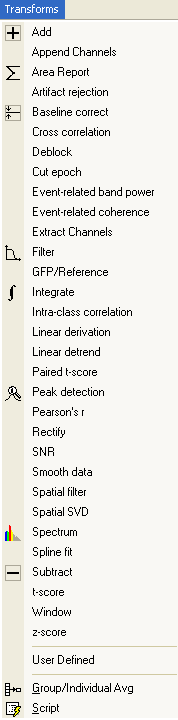
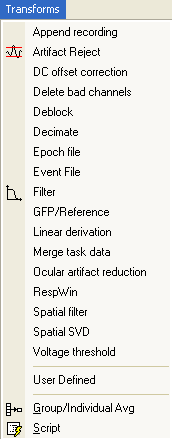
The following list contains brief descriptions of the Transforms that are included with the SCAN Analysis software. The file extensions in parentheses indicate which type(s) of data files can be used with each transform (CNT refers to continuous data files; EEG refers to epoched data files; AVG refers to averaged data files).
Combining Data Files
- Append Channels (AVG). Append channels from one AVG file to a different AVG file.
- Append Recording (CNT). Attaches (concatenates) one CNT file to another.
- Append Sweeps (EEG). Attaches (concatenates) two EEG files together in a single file.
Basic Mathematical Operations
- Add (AVG, EEG). Sums data from two files together with averaging.
- Area Report ...(EEG, AVG). Creates an ASCII file (DAT extension) that will contain the Sum, Mean Amplitude, or Area information for the specified interval.
- Average (EEG). Generates an average from a sequence of single sweeps.
- Average Bands (frequency domain AVG, COH) -
This option formerly existed as the AVGBAND.exe utility program for the DOS version of EDIT. It is used to redefine the frequency bands that are exported to an ASCII file. - Epoch File (CNT) -
After retrieving a continuous file, the Epoch File option is used to create an EEG file containing a series of sweeps. - Group/Individual Avg (AVG) -
The Group/Individual Average option creates a group average from individual AVG data files. - Integrate (AVG, EEG; time domain only) -
Computes an accumulation sum of the voltages across each sweep, where each data point is multiplied by the inter- point distance (or dwell time). When appropriately baseline corrected, this integrated sum provides an accurate area estimate for evoked potential peaks. - Linear Derivation (CNT, EEG, AVG) -
The linear derivation transform enables the creation of new channels as arbitrary linear combinations of existing channels. - Rectify (EEG, AVG) -
The Rectify transform is a simple "absolute value" operation: all positive waveform values are left unchanged, and all negative waveform values are inverted to their corresponding positive values. - Smooth Data (AVG, EEG) -
Averaged data files may be smoothed, that is, a given data point may be averaged with adjacent points to create a smoother waveform. - Spline Fit (EEG, AVG) -
Spline- fitting transforms an existing waveform to a new, specified number of points (as needed to permit FFT analyses, for example). - Subtract (AVG, EEG, COH) -
The Subtract option computes the difference between two like files, and displays the results as a difference waveform. - Window (EEG, AVG) -
The Window transform applies a window taper to single- sweep epochs. Application of a window can be useful to minimize edge effects.
Artifact Removal and Pre-
- Artifact Rejection – Voltage (EEG, time and frequency domain). The Artifact Rejection option will automatically reject (or accept) sweeps in which the voltage in a designated channel(s) exceeds defined criteria.
- Artifact Rejection – Frequency (EEG, time and frequency domain). The Artifact Rejection option will automatically reject (or accept) sweeps in which the specified spectral frequencies exceed a user defined criteria.
- Baseline Correction (EEG, AVG) -
Allows the removal of D.C. offset from the data. - DC Offset Correction (CNT) -
Removes DC drift and offset artifact, with consideration for stimulus and response events. - EKG Noise Reduction* (CNT) – SCAN 4.3 – Toolbox 2003 Reduces ballistocardiogram and other heartbeat artifact from CNT files, particularly important for recordings obtained in MR environments.
- Filter (CNT, EEG, AVG) -
The Filter transform performs a variety of filtering options on the data. These include High Pass, Low Pass, Band Pass, Band Stop, zero phase shift (digital) and analog simulation types of filtering. - Gradient/Blink Noise Reduction* (CNT) – SCAN 4.3 – Toolbox 2003. Reduces MR sequencing and blink artifact from CNT files.
- Linear Detrend (EEG, AVG) -
Removes linear trends from averaged waveforms. This operation can be used to remove a drift in the data that extends beyond the sample epoch. - Ocular Artifact Reduction (CNT, EEG) -
One (of several) computational methods for removing VEOG artifact. The method employs a regression analysis in combination with artifact averaging to produce a reliable and valid method for artifact removal.
Signal Processing Options
- Coherence (EEG) -
Provides a frequency- dependent measure of the degree of linear relatedness between two channels. This symmetric measurement is computed from a collection of EEG epochs sampled from either ongoing or event- related activity. High coherence indicates that amplitudes at a given frequency are correlated across EEG samples, and, moreover, have a constant time lag (phase angle) between the compared channels. - Event-
Related Band Power (AVG, EEG) Computes power (or amplitude) of induced (and/or evoked) event- related EEG activity in a centered frequency band as a function of time (i.e., power during sections of an evoked potential). - Event-
Related Coherence (EEG, AVG) - Computes coherence during selected sections of evoked potential recordings. - Forward FFT (EEG) -
The Forward FFT option is used to convert time domain data (real or complex) to complex frequency domain data. - GFP/Reference (CNT, EEG, AVG) -
Calculates mean Global Field Power (GFP - defined as the standard deviation across multiple channels as a function of time within a sample interval). Also allows the generation of user- defined referencing schemes for data sets. - Inverse FFT (EEG, after Forward FFT) -
Only available after an EEG file is retrieved that has had the Forward FFT transform performed. The Inverse FFT option will restore the data file to its original time domain form. - SCD/Interpolate (EEG, AVG, CNT -
time domain) - Provides Scalp Current Density (SCD; also known as Current Source Density) which is the radial current density at the scalp surface as estimated from spatially sampled potential measurements. - Spatial Filter (CNT, EEG, AVG) -
Removes and/or retains signals in spatial subspaces of the full measurement space in the context of a control signal. - Spatial SVD (CNT, EEG, AVG) -
The spatial singular value decomposition (SVD) transform can be applied to any time domain file type (AVG, EEG, or CNT). This transform generates spatial component topographies, fraction of total variance explained by each component, and a linear derivation file for deriving component time series. - Spectrum (AVG) -
Converts time domain average waveforms consisting of a power- of- 2 number of points using Fourier analysis to obtain an amplitude (i.e., root power) spectrum at each electrode.
Statistical Operations
- Cross Correlation (AVG) – Creates a correlation function by computing the correlation between electrodes across a lag series. It can be used to examine the relationships between or among electrodes by shifting the waveforms in time.
- FSP Average (EEG) – Provides an objective measure of detection for the auditory brainstem response (ABR). Because of the small magnitude of the ABR, it has a particularly low signal-
to- noise ratio (SNR) requiring a very large number of averaged sweeps for detection. This creates two related problems: (1) the SNR can vary considerably between recording sessions, so that the same number of sweeps may yield averages of different quality; and (2) the SNR can vary considerably within a recording session so that a bad block of sweeps can potentially degrade the average which is building. The Fsp transform provides a statistical means for dealing with both problems. - Intra-
class Correlation (AVG) - Provides a measure of overlap and related variability between two waveforms (from two files). - Paired t-
score (AVG) - Provides a statistical measure that compares two related or matched groups, or for comparing test- retest measures on the same group. - Pearson's r (EEG, AVG) -
Computes Pearson's r correlation coefficients between paired electrodes within a specified latency range. - t-
score (AVG) - Calculates t- tests for each electrode over time for waveform data and over frequency for spectral data. - z-
score (AVG) – Transforms the waveform from amplitude to standard deviation measures from the mean .
Miscellaneous Utility Options
- Cut Epoch (EEG, AVG) -
Creates a new AVG or EEG file with Start and Stop time points that are less than the original file. - Delete Bad Channels (CNT) -
Creates a new CNT file with the "Bad" channels excluded. - Delete Rejected Sweeps (EEG) -
Creates a new EEG file containing only the sweeps that have been accepted. - Event File (CNT) -
Creates a text file that contains all of the events in the CNT file, and can be used for epoching or when event clarification is needed. - Extract Channels (CNT, EEG, AVG) -
Creates a new data file containing only the channels you select. - Merge Task Data (CNT) -
Merges with behavioral data such as stimulus/response codes, latency, and accuracy with continuous data files. This allows future sorting of sweeps by any combination of these variables. - Peak Detection (AVG, EEG) -
Used to detect automatically the peak voltage within a user specified range in EEG or AVG files. - RespWin (CNT) – Is a utility program that is used to associate responses with specific stimuli, such as in the case where there are intervening stimuli between the target stimulus and the response.
- Sort Sweeps (EEG) -
Creates a new EEG file that contains only the sweeps you designate. - Voltage Threshold (CNT) -
The Voltage Threshold allows the insertion of event markers into a CNT file on the basis of a detected voltage in a specified channel, and to reject sections of a CNT where detected voltages exceed a specified threshold.